
Azure Functions Flex Consumption with Locked Storage and the Gotchas That Break Deployments
In this article
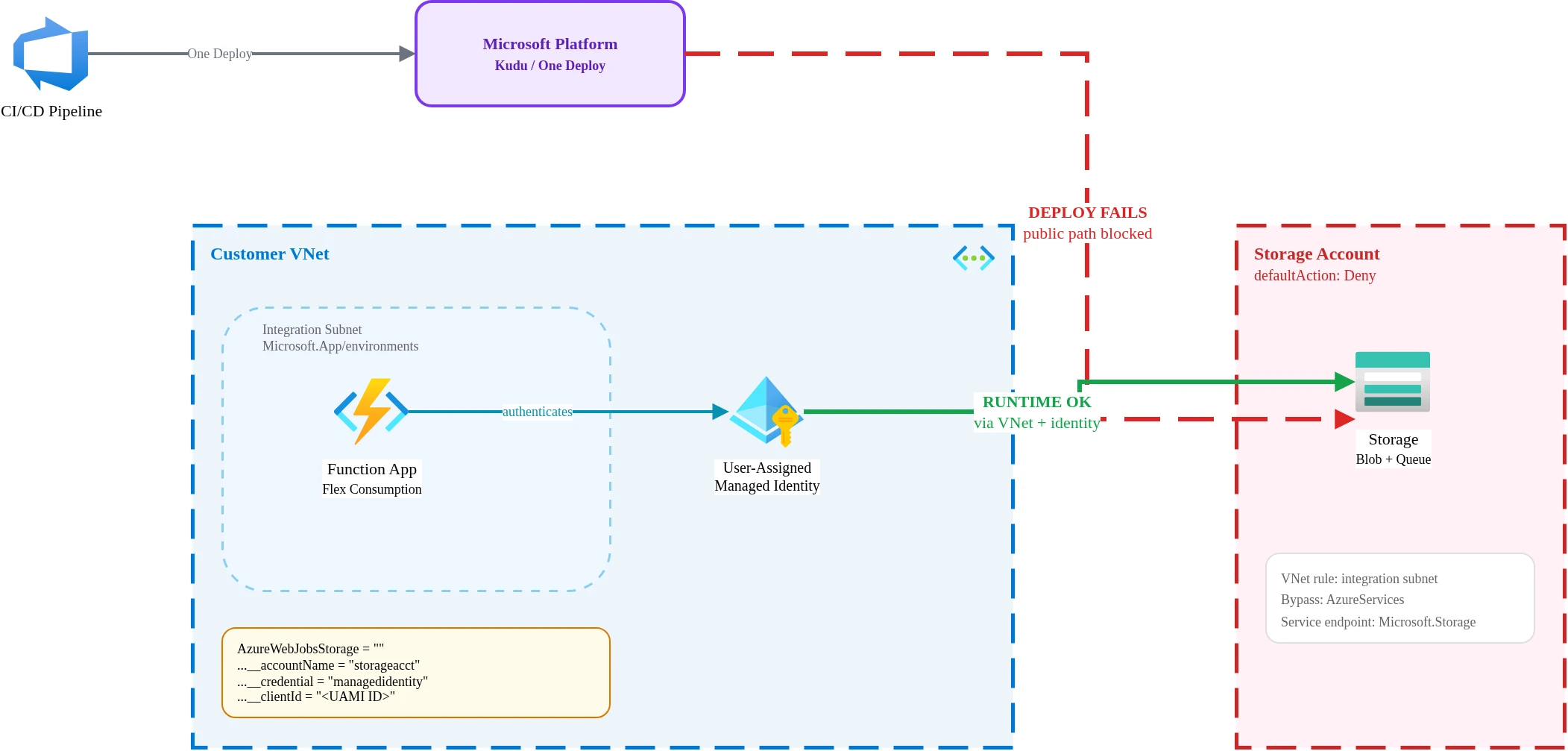
In short: Azure Functions Flex Consumption looks like the obvious choice for secure enterprise serverless until you lock down its storage account and deployments break. The combination that works: One Deploy, user-assigned managed identity, the
AzureWebJobsStorage__accountNameformat withAzureWebJobsStorageset to an empty string, and a storage firewall that allows the integration subnet plus the AzureServices bypass. This post walks through what fails, why, and the exact configuration that holds together in production.
Update, 2 August 2026: Flex is now Microsoft’s forward path for Linux serverless. The Linux Consumption plan retires on 30 September 2028 and no longer receives feature work, so migrations like the one behind this post will only get more common. The workaround below still matches the platform behaviour as of this date.
Azure Functions Flex Consumption is Microsoft’s newest serverless hosting plan, designed for scale-to-zero workloads with per-second billing and VNet integration built in. On paper it checks every box for enterprise serverless: private networking, managed identity support, and a consumption-based cost model that finance teams actually approve.
Then you lock down the storage account and deployments stop working.
Flex Consumption is viable for secure enterprise workloads, but only if you treat deployment, storage, and identity as one design problem rather than three separate settings. I learned that the hard way. Here is what I found.
The Symptom
The pattern is predictable. You provision a Flex Consumption function app, connect it to a storage account, deploy successfully, and ship to a test environment. Everything works. Then the security review happens. The storage account’s network rules get tightened to defaultAction: Deny, matching the organisation’s baseline policy for all storage resources. Standard practice.
The next deployment fails with a BlobUploadFailedException. The function app can no longer push its deployment package to the storage account. Nothing in the application code changed. Nothing in the function configuration changed. Only the storage network rules changed, and that single change broke the entire deployment pipeline.
Azure docs: Flex Consumption plan overview · Deployment technologies
Why You Expect It to Work
The function app has VNet integration. The integration subnet has a Microsoft.Storage service endpoint configured. Managed identity is assigned and has RBAC roles on the storage account. From a pure networking standpoint, the function app should reach the storage account over a private path. And at runtime, it can. The function triggers fire, blobs get read and written, queues get processed. Runtime traffic flows through the VNet integration as expected.
The problem is that deployment and runtime use different traffic paths.
What Actually Breaks
Three gotchas combine to create the failure. Each one is documented somewhere, but they live in separate parts of the Azure documentation with no cross-reference between them.
One Deploy Is the Only Deployment Method
Traditional zip deploy (az functionapp deployment source config-zip) doesn’t work with Flex Consumption. Microsoft requires a different deployment mechanism called One Deploy, which routes through the Kudu build service. Not optional. Flex Consumption does not support the same deployment methods as the regular Consumption plan or the Premium plan.
In my testing, deployment traffic from the Kudu endpoint did not consistently route through the VNet integration path, causing failures when storage was locked down. The function app’s runtime traffic routed correctly through the integrated subnet, but deployment traffic appeared to originate from Microsoft’s shared platform infrastructure rather than my VNet. The result: deployment traffic hits the storage account’s public endpoint, gets denied by the defaultAction: Deny rule, and the deploy fails.
I want to be precise here: this was the observed behavior in my tested configuration (West Europe, March 2026). Microsoft’s platform infrastructure evolves, and the routing behavior may differ across regions or change as the Flex Consumption runtime matures. But in my deployment pipeline, this was consistent and reproducible.
The AzureWebJobsStorage Format Matters
The traditional way to configure identity-based storage access for Functions uses individual service URI settings:
AzureWebJobsStorage__blobServiceUri = "https://storageaccount.blob.core.windows.net"
AzureWebJobsStorage__queueServiceUri = "https://storageaccount.queue.core.windows.net"
AzureWebJobsStorage__tableServiceUri = "https://storageaccount.table.core.windows.net"
This format may not work in all deployment scenarios with locked storage on Flex Consumption. Microsoft’s migration guidance for identity-based connections documents a different approach: set AzureWebJobsStorage to an empty string and use the AzureWebJobsStorage__accountName format instead.
AzureWebJobsStorage = ""
AzureWebJobsStorage__accountName = "storageaccountname"
The single accountName setting appears to be required for the deployment path to correctly resolve storage through the identity-based route. I tested both formats. The individual service URI approach worked at runtime but failed during deployment. The accountName format worked for both.
Identity Type and RBAC Setup
Identity-based storage access works on Flex Consumption, but the specific combination of identity type and RBAC roles matters more than the documentation suggests. I’d recommend validating whether your deployment path, provider version, and hosting configuration behave correctly with system-assigned versus user-assigned identity before standardising.
In my testing, user-assigned managed identity with explicit RBAC roles was the reliable path. The required app settings:
AzureWebJobsStorage__accountName  = "storageaccountname"
AzureWebJobsStorage__credential   = "managedidentity"
AzureWebJobsStorage__clientId     = "<user-assigned managed identity client ID>"
The RBAC roles I assigned to the user-assigned identity on the storage account:
- Storage Blob Data Owner for reading and writing deployment packages and blob triggers
- Storage Account Contributor for storage account-level operations during deployment
- Storage Queue Data Contributor for the internal queue-based coordination that Functions uses
All three were necessary. Removing any one of them caused either deployment failures or runtime trigger issues.
Azure docs: Connecting to host storage with an identity
The Working Pattern
After iterating through several failed configurations, this is the complete setup that works:
- Flex Consumption function app with VNet integration using a subnet delegated to
Microsoft.App/environments - User-assigned managed identity attached to the function app, with Storage Blob Data Owner + Storage Account Contributor + Storage Queue Data Contributor on the storage account
- App settings using
AzureWebJobsStorage__accountNameformat (not individual service URIs), withAzureWebJobsStorageset to an empty string - Storage account with
defaultAction: Deny, a VNet rule allowing the integration subnet via service endpoint, andAzureServicesbypass enabled - One Deploy as the deployment method in CI/CD
Every piece matters. Remove the AzureServices bypass and deployment fails. Switch to individual service URIs and deployment fails. Use system-assigned identity without the right RBAC combination and triggers silently stop firing. The configuration is specific and it does not tolerate partial implementation.
Terraform and IaC Caveats
If you manage Flex Consumption infrastructure with Terraform, expect friction. The azurerm provider has been catching up to Flex Consumption, and several sharp edges remain.
The AzureWebJobsStorage empty-string workaround creates an immediate problem. The azurerm provider’s validation may reject an empty string for what it expects to be a storage connection string. Microsoft’s own migration guidance documents this as the correct approach, but the provider validation does not always agree. You may need to use lifecycle { ignore_changes } on the app settings block or set the empty string through azapi_update_resource after the initial deployment.
Consider using azapi_resource for the function app itself if your version of the azurerm provider does not model Flex Consumption networking correctly. The azapi provider lets you work directly with the ARM API schema, which means you can set the exact properties that Flex Consumption requires without waiting for the azurerm provider to add support.
App settings with __ separators (like AzureWebJobsStorage__accountName) work fine in the azurerm provider’s app_settings block. Double underscores are valid Terraform map keys and pass through to the Azure API without issues.
GitHub issues #2496 and #2635 on the Azure Functions repository document active friction between provider versions and the Flex Consumption runtime. Check these before filing new issues.
When NOT to Choose Flex Consumption
Flex Consumption is not the right plan for every serverless workload.
Skip it if your application needs persistent connections like SignalR hubs or long-running WebSocket sessions. The scale-to-zero model and instance lifecycle are not designed for connection persistence.
Skip it if your deployment pipeline cannot support One Deploy. If you rely on Run From Package with external URLs, FTP-based deployment, or container image deployment, Flex Consumption does not support those paths today.
Skip it if you need full control over both runtime and deployment traffic routing through your VNet. The deployment path routing behavior I described above means your deployment traffic may not stay inside your network perimeter. If that is a hard requirement, the Premium plan with full VNet injection gives you control over both paths.
Skip it if your storage security requirements mandate private endpoints only, with no service endpoint and no AzureServices bypass. The working configuration I documented relies on both of those. A private-endpoint-only storage architecture with Flex Consumption is not a pattern I have validated. If you do head down the private-endpoint route, the DNS side has its own traps; The DNS Problems That Break Your Private Link Connectivity on genioct.be maps them.
The Field Lesson
The official documentation pieces exist. Microsoft documents the Flex Consumption hosting plan, the One Deploy mechanism, the identity-based storage connection format, and the Terraform provider limitations. The operational challenge is that these documents do not connect into a single “enterprise deployment” narrative. A team following one document at a time makes reasonable choices at each step and ends up with a broken deployment.
I spent the debugging hours so you don’t have to. The configuration is specific, it is documented above, and it works. If you are evaluating Flex Consumption for a workload that touches secured storage, start with the complete working pattern and remove pieces only after you have validated that removal does not break something. Working backward from a known-good configuration is faster than assembling one from scattered documentation.
Looking for Azure architecture guidance?
We design and build Azure foundations that scale - landing zones, networking, identity, and governance tailored to your organisation.
More from the blog

When Azure Functions Can Replace Entra Application Proxy and When They Cannot