Palo Alto Cloud NGFW on Azure and What a PoC Revealed About the Managed Firewall
In this article
Late 2023, we ran a proof of concept for a pharmaceutical company that needed to scale their Azure firewall layer. Their existing Palo Alto deployment was hitting throughput limits, SD-WAN traffic from remote sites was growing, and the security team wanted to keep Palo Alto rather than migrating to Azure Firewall.
The PoC tested two approaches side by side: the traditional VM-Series (IaaS, you manage the VMs) and Cloud NGFW for Azure (PaaS, Palo Alto manages the infrastructure). Both worked. The differences showed up in places nobody expected.
Why a Pharmaceutical Company Cares About This
Pharmaceutical enterprises are not typical cloud consumers. Their compliance frameworks name specific security products. Validation processes lock in vendors for years. And when a GxP-regulated environment runs traffic through a firewall, the security team needs to explain every component in an audit.
They already ran Palo Alto across three data centres and managed everything through Panorama. Their Azure environment had grown from a handful of spokes to 40+ subscriptions across West Europe and East US. Azure Firewall was never seriously considered because their compliance documentation referenced Palo Alto by name, and rewriting validation paperwork for a different firewall vendor was a project nobody wanted to start.
The question was not “Palo Alto or Azure Firewall?” but “which Palo Alto deployment model?”
What Cloud NGFW Actually Is
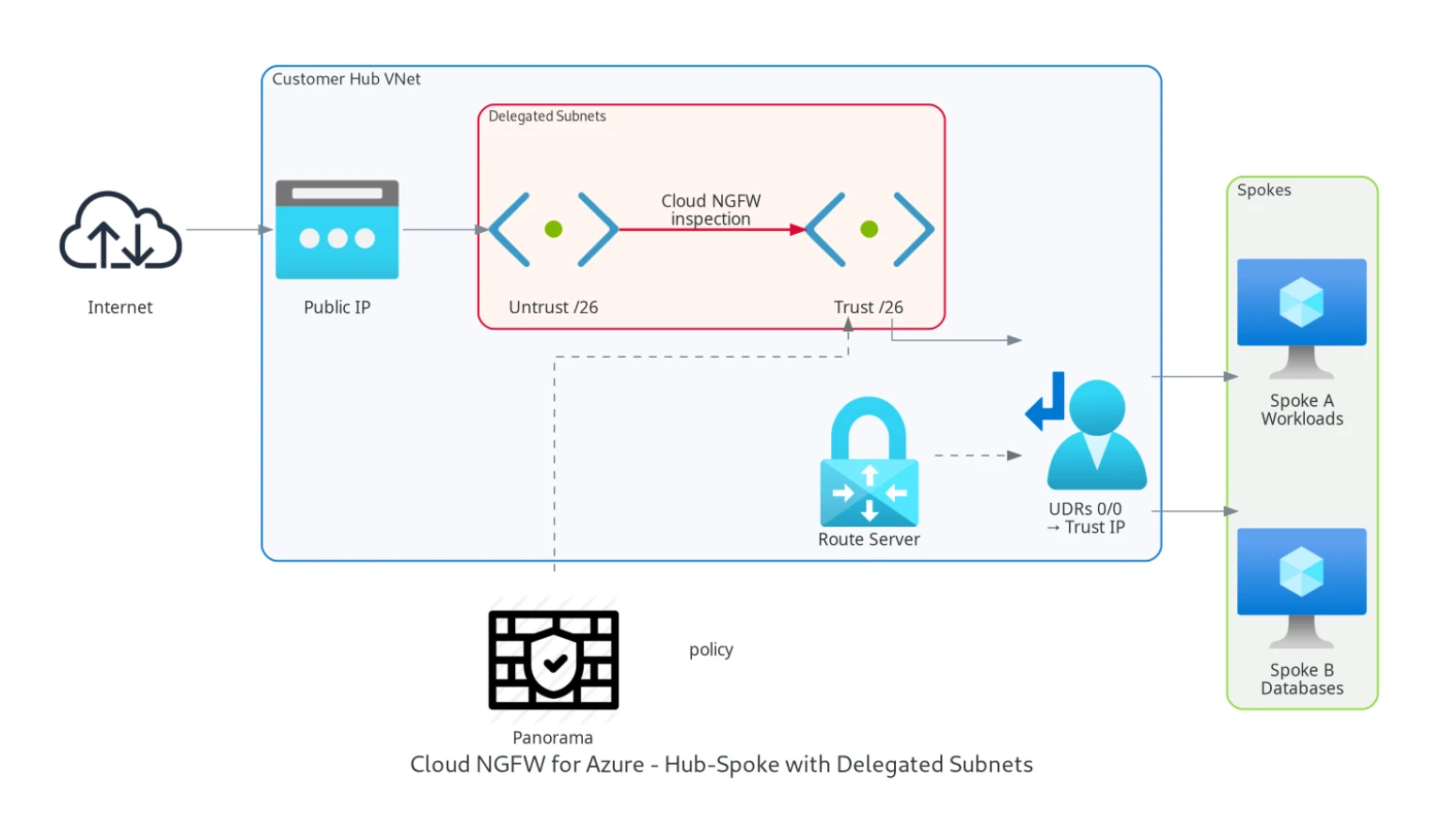
Cloud NGFW for Azure is delivered as an Azure Native ISV Service. You don’t deploy VMs. You don’t manage availability zones or load balancers. You create a Cloud NGFW resource in your subscription, delegate two /26 subnets to the PaloAltoNetworks.Cloudngfw/firewalls provider, and Palo Alto manages the service lifecycle and backend scaling.
You steer traffic to private IPs exposed in the delegated subnets in your VNet. Traffic routes through them using the same UDR-based forwarding you would use with any NVA.
Cloud NGFW also supports Virtual WAN hub deployments, though our PoC focused on the VNet-based hub-spoke model.
You manage the rulestack (Palo Alto’s term for the policy set), which is an ARM resource like any other Azure object. Because Cloud NGFW is exposed through Azure-native APIs, it can be deployed and managed with ARM templates, the Azure CLI, or the Azure Terraform provider. Panorama integration is available if you already have it for on-premises management.
Palo Alto docs: Cloud NGFW for Azure overview · Getting started
The PoC Architecture
The pharmaceutical company’s environment had internal hubs in West Europe and East US, with SD-WAN routers connecting remote manufacturing sites and offices through Azure Route Server. The PoC tested three scenarios:
Spoke-to-spoke traffic through the firewall layer. Workloads in different VNets passing through a central hub with Palo Alto inspecting east-west traffic. We validated routing, flow symmetry, and whether one traffic flow always passed the same firewall instance.
Site-to-site traffic from remote offices. SD-WAN routers in remote sites connected via IPsec to the central hubs. Azure Route Server handled BGP route propagation, and the firewalls inspected traffic between remote sites and Azure spokes.
Inbound internet connectivity. External traffic arriving at public-facing services needed to pass through the firewall for inspection before reaching the backend workloads.
For the VM-Series leg of the PoC, we deployed active-active pairs behind an Internal Load Balancer. For the Cloud NGFW leg, we created the managed resource and delegated subnets.
What Cloud NGFW Got Right
Deployment took about 30 minutes. Compare that to the VM-Series setup: provisioning VMs, bootstrapping PAN-OS, configuring interfaces, setting up the load balancer, health probes, and availability zones. That took the better part of two days.
Palo Alto manages the service lifecycle and software updates, removing much of the patching and appliance-maintenance burden you would carry with VM-Series. For a pharmaceutical company where every firewall maintenance event requires a change advisory board and a post-change validation, that is a real operational win.
The rulestack model works well with Infrastructure as Code. Because rulestacks are ARM resources, they fit naturally into the same Terraform pipelines that manage the rest of the Azure environment. With VM-Series, you need two Terraform providers (Azure for infrastructure, PAN-OS for firewall configuration), two state files, and a deployment pipeline that coordinates between them.
Panorama integration was straightforward. The existing on-premises Panorama picked up the Cloud NGFW instances through the Azure plugin. Cloud Device Groups kept the Azure-specific policy separate from physical appliance rules while sharing a common security baseline. One prerequisite to check early: Panorama integration depends on the Azure plugin and supported Panorama versions, so version alignment should be verified before starting the deployment.
Authentication integrated cleanly with Entra ID through the Palo Alto Customer Service Portal. The security team managed access using existing enterprise application assignments.
Where Cloud NGFW Surprised Us
VNet peering costs. Because Cloud NGFW introduces Azure peering-related data transfer costs on inspected traffic, we saw a non-trivial monthly cost overhead in this environment. For a pharmaceutical company pushing terabytes of data between spokes, across regions, and to remote sites, this adds up. In the VM-Series design we tested, inspected traffic stayed inside the customer hub VNet, so this specific peering-cost component did not apply.
We estimated the peering overhead at roughly EUR 800-1,200/month for this environment’s traffic patterns. Not a dealbreaker, but this cost sits outside the Cloud NGFW service charge itself and only becomes visible when you model the surrounding Azure network data paths. Validate the current Azure VNet peering rates for your regions and contract before finalising the design.
Subnet delegation is strict. The two /26 subnets delegated to PaloAltoNetworks.Cloudngfw/firewalls can’t be used for anything else. In a hub VNet where address space is already tight from years of organic growth, carving out two /26 blocks required re-addressing parts of the existing hub. Plan your IP addressing early.
NSG interaction caught us off guard. When exposing ports on the Cloud NGFW for inbound services, you also need to modify the associated NSG to allow that traffic at the Azure network level. The Cloud NGFW rules alone are not enough. Two layers of policy (NSG + rulestack) need to stay in sync, and the failure mode when they disagree is a silent drop with no obvious error in the firewall logs.
Inbound design flexibility was more constrained than with VM-Series in our PoC. Scenarios that expected multiple distinct frontend IP-driven DNAT patterns required workarounds that would have been straightforward on VM-Series.
DNS proxy worked, similar to Azure Firewall’s DNS proxy capability. For environments using private DNS zones and conditional forwarding, this removed the need for a separate DNS forwarder.
VM-Series Performance Numbers
We ran the VM-Series leg of the PoC on Standard_DS5_v2 instances (16 vCPU). Spoke-to-spoke performance through the active-active pair with Internal Load Balancer measured 9.12 Gbps aggregate (4.6 Gbps up, 4.52 Gbps down). The load balancer distributed traffic almost perfectly: 48% to one instance, 52% to the other.
CPU load on the firewalls averaged 33-37% during sustained throughput tests, leaving headroom for production bursts. The bottleneck was the test client VMs, not the firewalls.
Failover when rebooting one firewall was detected within 14 seconds, with no perceived outage on spoke-to-spoke ICMP traffic. Site-to-site failover (BGP reconvergence through Azure Route Server) took between 24 and 72 seconds, consistent with Route Server’s 180-second hold timer and broader route convergence behavior.
Cloud NGFW doesn’t expose the same performance knobs. You don’t choose the VM size or the number of instances. Palo Alto scales the backend based on traffic load. For the PoC, throughput was adequate for all test scenarios, but we couldn’t benchmark it the same way because we had no visibility into the underlying instance count or sizing.
SD-WAN Integration
Both VM-Series and Cloud NGFW sat between the SD-WAN layer and the spoke workloads. UDRs on the SD-WAN subnets forced traffic through the firewall before reaching spokes, and spoke UDRs forced return traffic back through the firewall. Azure Route Server propagated routes using BGP, with the SD-WAN routers advertising remote site prefixes and learning spoke routes.
Cloud NGFW handled the SD-WAN traffic flows without issues. The UDR-based forwarding model is identical to what you would use with VM-Series or Azure Firewall. No special configuration was needed on the Cloud NGFW side to accommodate the SD-WAN topology.
What We Recommended
For the pharmaceutical company, Cloud NGFW was the better fit for new hub deployments where they didn’t need the full control of VM-Series. The operational savings (no patching, no clustering, no load balancer management) aligned with their goal of reducing the infrastructure team’s firewall maintenance burden.
VM-Series remained the choice for the existing hubs where tight IP addressing made subnet delegation impractical, and where multiple public IPs were needed for complex inbound architectures.
The hybrid model (some hubs on Cloud NGFW, some on VM-Series, all managed through Panorama) worked in the PoC but added Panorama plugin complexity. Both deployment types appeared in Panorama, but Cloud Device Groups behave differently from traditional device groups, and the operations team needed training on the distinctions.
Practical Takeaways
If you are evaluating Cloud NGFW for Azure, here is what the feature sheet won’t tell you:
Budget for VNet peering costs. Estimate your monthly inspected traffic volume and check the Azure VNet peering rates for your region. In high-traffic environments like this one, this overhead became a material share of the total firewall cost.
Plan your hub IP addressing before deploying. Two /26 subnets is a hard requirement, and they can’t overlap with existing allocations.
Test NSG and rulestack interaction early. Teams used to VM-Series (where the firewall is the only policy enforcement point) often forget to update the NSG when adding rulestack entries, causing silent drops.
Verify public IP requirements. If you need multiple DNAT destinations, validate the exact supported pattern in the product documentation at design time.
Cloud NGFW is a young product. It reached GA for Azure in August 2023, only a few months before this PoC, so the feature set was still maturing. For organisations with existing Palo Alto investments and a clear path to managed services, it is worth a serious evaluation.
Related: Azure Firewall: When Cloud-Native Network Security Finally Makes Sense the original case for managed firewalls · Azure DNS Private Resolver: The End of Custom DNS VMs reducing NVA sprawl in the hub
Need help with your Azure security posture?
We help enterprises design and tune Azure security controls: WAF policies, Sentinel ingestion, Defender for Cloud, identity governance, and NIS2/DORA readiness.
More from the blog
Palo Alto Cloud NGFW for Azure in 2026 and When It Beats Azure Firewall Premium

Azure Firewall in 2026 and When Standard, Premium, or an NVA Is the Right Call