APIM v2 Migration Playbook: Moving from Classic to Standard v2 or Premium v2
In this article
- Why Teams Are Moving Now
- Step 0: Pick the Target Tier, or Rule Yourself Out
- What Migrates Cleanly and What Does Not
- Preserve Subscription Keys, Spare Your Consumers
- The New Managed Identity Is Nobody’s Identity Yet
- Tooling: There Is No Migration Tool
- Non-Prod First, Then Boring Production
- 1. Migrate the lowest-risk environment completely
- 2. Validate against real traffic
- 3. Cut over behind a stable front
- 4. Decommission deliberately
- Effort Calibration
- The Bottom Line
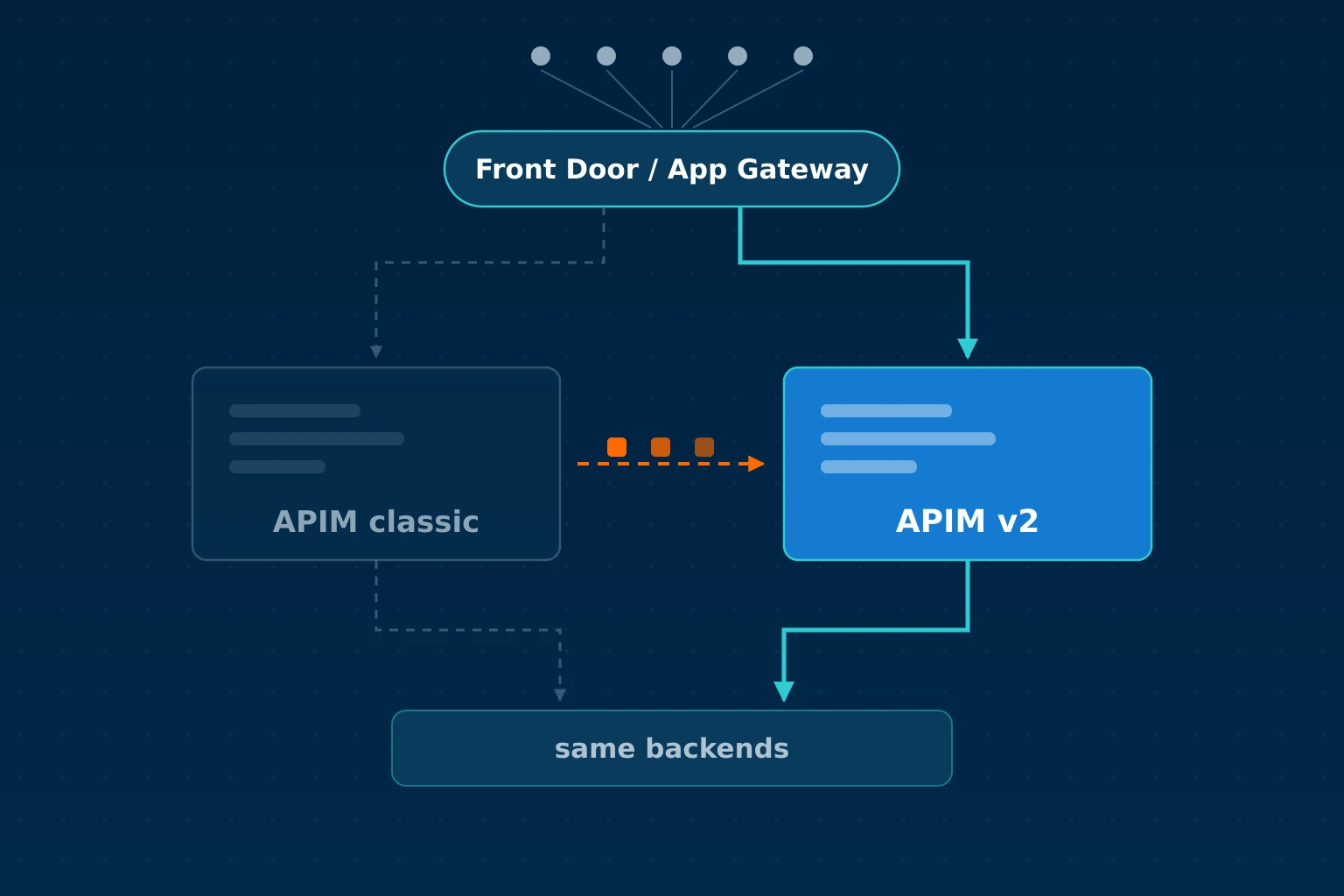
In short: There is no in-place upgrade from classic APIM to the v2 tiers, and no Microsoft migration tool either. The move is a parallel deployment: stand up a new v2 instance, replay your configuration onto it, validate, and cut traffic over. This playbook covers the SKU decision, what migrates cleanly and what does not, how to keep your consumers’ subscription keys working, the cutover order we use with clients, and the short list of reasons to stay on classic Premium for now.
In APIM v2 vs Classic we covered what changed on the new platform and why the migration is not a SKU swap. That post keeps pulling readers who are weighing the decision. This one is for the next step: you have decided to move, and now you need a plan that survives contact with production.
Why Teams Are Moving Now
Microsoft has not announced a retirement date for the classic tiers, and the official FAQ still says you can provision them. But the first half of 2026 made the direction hard to misread:
- Between 15 March and 15 May 2026, Microsoft aligned classic-tier resource limits with the v2 limits, rolled out per tier. Existing instances that exceeded the new limits were grandfathered at 10% above their observed usage, enough to keep running but too little to grow into.
- On 15 March 2026, trusted service connectivity was retired. Classic gateways that reached Storage, Key Vault, Service Bus, Event Hubs, or Container Registry through the legacy trusted-service path now need managed identity and proper network rules.
- The Git configuration repository and the direct Management API were already retired in March 2025.
Microsoft has not deprecated classic, but it is converging it, limit by limit and feature by feature, with the platform it actually invests in. Every new capability ships on v2 first. If your APIM footprint has a multi-year horizon, you will end up on v2 eventually; the open question is the timing.
Azure docs: Service limits 2026 update · Breaking changes overview
Step 0: Pick the Target Tier, or Rule Yourself Out
Before any migration work, check the disqualifiers. As of June 2026, the v2 tiers still do not support:
- Multi-region deployment
- Self-hosted gateway
- Sending events to Event Grid
- Backup and restore
- Azure DDoS Protection on the instance
- Cipher configuration and client certificate renegotiation
- Free managed TLS certificates
If any of those is load-bearing for you, stay on classic Premium and revisit in six months. Microsoft closes gaps regularly, but you should not plan a migration around a feature that does not exist yet.
If none of them applies, the tier choice is usually short:
Standard v2 is the default for production. Outbound VNet integration reaches private backends, an inbound Private Endpoint gives private client access, and it scales to 10 units. Remember that the gateway, management plane, and developer portal stay internet-reachable until you add the Private Endpoint and disable public network access. The Private Endpoint covers the gateway endpoint only; it does not privatise every APIM surface the way classic internal VNet injection did.
Premium v2 is for full network isolation. It supports simplified VNet injection, availability zones, and up to 30 units, running on a dedicated App Service Environment. Full VNet injection is a create-time decision: outbound VNet integration can be enabled on an existing instance later, but switching a running instance into full injection is not supported. Decide before provisioning whether you need full network isolation or only outbound access to private backends.
Basic v2 has no VNet capability at all, in either direction. It only fits genuinely public dev/test APIs. For non-production environments that need cheap internal-mode APIM inside a VNet, classic Developer remains the only option; there is no Developer v2.
Workspaces, for teams that delegate API management across groups, are now available on all three v2 tiers, with workspace gateways billed separately.
What Migrates Cleanly and What Does Not
The inventory decides your effort estimate. The short version:
| Asset | Carries over? | Notes |
|---|---|---|
| API definitions and operations | Yes | Export/import or replay via IaC |
| Policies | Mostly | Test expressions using context.Deployment; behaviour can differ on v2 |
| Named values | Yes | Key Vault-referenced values need the new instance’s managed identity granted on the vault first |
| Products and subscriptions | Yes | Subscription keys can be set explicitly on create, see below |
| Custom gateway domains | Tier-dependent | Standard v2 hosts one custom gateway domain; Premium v2 supports multiple. The domain must be publicly resolvable |
| Global CA certificates | No | Backend CA trust moves to per-backend serverX509Names pinning |
| Managed identity | New principal | Same configuration, new object ID: redo every RBAC assignment |
| Developer portal content | Partially | Reports, the custom HTML widget, and custom widgets are unavailable on v2 |
| Built-in analytics history | No | Azure Monitor-based dashboard going forward; the classic built-in dashboard retires in March 2027 anyway |
| Backup/restore | No | Your IaC and configuration exports are the recovery story on v2 |
Two of these deserve more than a table row.
Preserve Subscription Keys, Spare Your Consumers
The one detail that saves the most coordination pain: when you create subscriptions on the new v2 instance through ARM, Bicep, Terraform, or the REST API, you can set primaryKey and secondaryKey explicitly instead of letting Azure generate them. Replay every subscription with its existing keys and your API consumers never notice the migration. No coordinated key rotation across twenty consuming teams, and no spreadsheet tracking which of them actually updated.
If you skip this and let the keys regenerate, the cutover becomes a multi-team coordination project. We have seen this one detail double the elapsed time of a migration.
The New Managed Identity Is Nobody’s Identity Yet
The v2 instance gets a fresh system-assigned identity with a new object ID. Every place the classic instance’s identity was granted access, Key Vault for certificates and named values, Storage, downstream APIs validating tokens, needs a new assignment before the v2 instance can even finish deploying its configuration. Do an RBAC inventory of the old identity up front (az role assignment list --assignee <objectId> plus Key Vault access policies) and script the grants. This is the most common reason a “finished” v2 instance fails its first end-to-end test.
Tooling: There Is No Migration Tool
Microsoft is explicit in the FAQ: no automated migration from classic to v2 exists. Three paths work in practice:
- You already manage APIM with Terraform or Bicep. Best position. The work is refactoring: change the SKU, rebuild the networking resources, fix what the plan flags. The azurerm provider accepts
BasicV2,StandardV2, andPremiumV2SKU names, but switchingsku_nameon an existing resource is a destroy-and-recreate, so model the v2 instance as a new resource alongside the old one. Some v2-specific properties, per-backendserverX509Namesamong them, still need the azapi provider. The v2 vs classic post covers the resource-shape changes and subnet delegation differences in detail. - Portal-managed instance, no IaC. Use APIOps: the extractor pulls APIs, policies, products, and named values from the classic instance into Git, the publisher replays them onto the v2 instance. You end the migration with your configuration in version control, which you should have had anyway.
- ARM/Bicep export and hand-cleaning. Works for small instances, painful beyond a dozen APIs. The older APIM DevOps Resource Kit was archived in February 2024; do not start a new migration on it.
Whichever path you take, the networking resources (delegated subnets, Private Endpoints, private DNS zones, NSG rules) are new builds. Classic subnet assumptions do not transfer; Standard v2 VNet integration wants a Microsoft.Web/serverFarms delegation and Premium v2 injection wants Microsoft.Web/hostingEnvironments.
Azure docs: APIOps · Terraform azurerm_api_management · VNet reference for v2
Non-Prod First, Then Boring Production
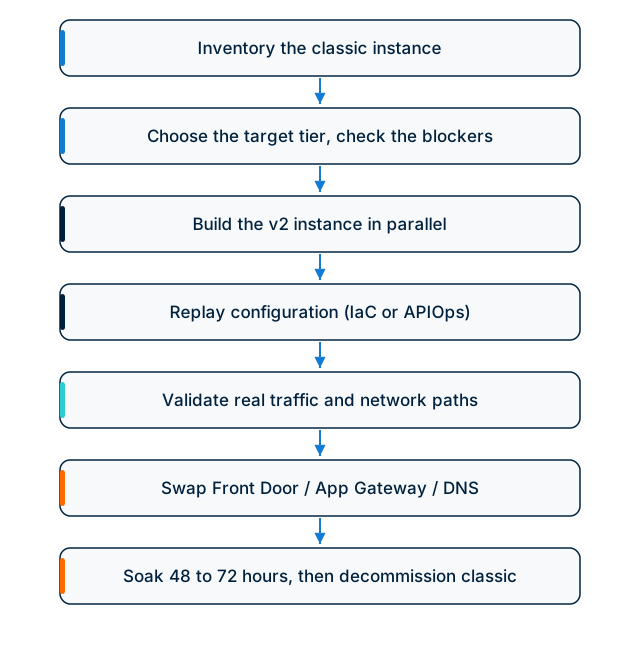
The phasing that works is unexciting by design.
1. Migrate the lowest-risk environment completely
Migrate dev or test for real, cutover included, rather than running a proof of concept on the side. The point is to surface the gotchas where they are cheap. Plan for the networking path (DNS resolution, Private Endpoint, Application Gateway or Front Door wiring) to consume most of the time. Configuration replay is the easy half.
2. Validate against real traffic
Functional tests passing is not validation. The failures that matter on v2 are the ones that only show up under real traffic shapes. Four we have hit in the field, with the full debugging stories on our architect’s personal blog:
- Backends signed by an internal CA return 500 at the gateway after cutover, because the classic global certificate store no longer applies. The fix is per-backend
serverX509Names, currently azapi-only territory: the internal CA backend trust writeup. - Requests with query strings over 2,048 bytes get rejected as a 404 without CORS headers, which sends teams hunting a CORS bug that does not exist: the 2 KB query-string limit. Classic has no URL limit, so the same clients worked fine before.
- OpenAPI imports that reference internal URLs fail with an unhelpful 400, because the fetching is done by Azure’s management plane rather than by your instance: the schema import gotcha.
- When anything else misbehaves, the HTTP response will not tell you why. The gateway logs in Log Analytics will: KQL recipes for the failure modes that break in production.
Add your own policy edge cases on top: rate-limit and quota behaviour under load, JWT validation against your identity provider through the new network path, and anything using context.Deployment properties.
3. Cut over behind a stable front
How disruptive the cutover is depends on what sits in front of APIM:
- Application Gateway or Front Door in front (the common enterprise pattern): cutover is a backend pool or origin swap. Clients see nothing. This is the strongest argument for fronting APIM with one of them if you have not already; see APIM vs Front Door vs App Gateway for which fits where.
- Custom domain pointing straight at APIM: drop the DNS TTL ahead of time, configure the same custom domain on the v2 instance, swap the record. Keep in mind v2 requires the custom gateway domain to be publicly resolvable even for private inbound patterns.
- Consumers calling the default
azure-api.nethostname: the v2 instance has a different default hostname, so this is the one case where consumers must change their configuration. If you preserved subscription keys, at least it is only the URL.
Watch error rates and latency for 48 to 72 hours with the classic instance still running. Rollback is a reverse swap, which is why the parallel-run cost is worth paying.
4. Decommission deliberately
Keep classic alive until the v2 instance has survived a full business cycle, including whatever monthly batch process nobody documented. Budget for the double-running window; for a Premium classic instance that is real money, and finance should hear about it before the invoice arrives. When you delete the classic instance, remember APIM soft-deletes: purge it if you need the service name released.
Effort Calibration
For a single-region setup with private backends, IaC in reasonable shape, and a frontend already on Application Gateway or Front Door, we typically see one to two weeks of engineering effort per environment, spread over three to four elapsed weeks because validation needs soak time. The first environment costs the most; the second is mostly replay. Environments with portal-managed configuration, multiple custom gateway domains, or developer portal customisations should plan for more. Multiple gateway domains on a Standard v2 target usually push the decision toward Premium v2, or toward a front-door pattern that consolidates hostnames before APIM.
The Bottom Line
The classic-to-v2 move is an infrastructure project with a configuration migration inside it, and the configuration is the easy part. Decide the tier on disqualifiers first, preserve your subscription keys so consumers stay out of the blast radius, treat the networking as a new build, validate against real traffic shapes rather than test suites, and cut over behind an Application Gateway or Front Door so the swap is invisible. Run it in that order and the migration stays boring, which is the best thing a migration can be.
Related reading: APIM v2 vs Classic: What Changed and What Breaks · APIM vs Front Door vs App Gateway · Azure Front Door in 2026: Standard or Premium · Private Link DNS Failure Modes
Planning an APIM v2 migration?
We help teams choose the right v2 target tier, rebuild the networking, replay configuration through IaC or APIOps, and cut over behind Front Door or Application Gateway without forcing consumers to change keys.